Complete Guide to the Seitron FREETIME+ Thermostat: Installation, Configuration, and Troubleshooting
Practical guide to the Seitron FREETIME+ thermostat with clock setting, comfort and economy temperatures, common faults, summer mode issues and PDF manuals.
Quick navigation
Contents
If you are looking for the Seitron FREETIME+ thermostat manual, this page gives you the practical instructions most users need: how to set the clock, choose comfort and economy temperatures, use the daily program correctly, troubleshoot common faults and download the PDF manual.
The Seitron FREETIME+ is a daily electronic thermostat that stays popular because it is simple to use once you understand the door controls, manual mode and the small time switches on the front.
What the Seitron FREETIME+ does
This thermostat manages room temperature with two main levels:
- Comfort temperature
- Reduced / economy temperature
It also offers:
- frost protection
- internal sensor offset adjustment
- manual mode
- automatic daily programming
Display and buttons
On the display you can usually check:
- current time
- detected room temperature
- flame symbol when heating is being requested
- hand symbol if manual mode is active
- battery status
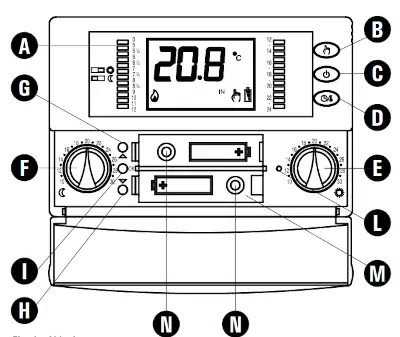
The main controls are simple:
- button for time setting
- HAND button for manual mode
- OFF button
- TIME / TEMPERATURE display toggle
- small front switches for hourly programming
How to set the correct time
If the clock is wrong, the automatic program will not work properly.
To set the clock:
- open the lower compartment door;
- press and hold OK for about 2 seconds;
- set the hour with the arrow buttons;
- press OK to move to the minutes;
- set the minutes;
- press OK again to save and return.
How to set the daily program
The daily program is built through the small switches visible on the front.
The logic is simple:
- one position corresponds to comfort
- the other corresponds to economy
Each switch represents a time segment of the day. Once the clock is correct and both temperatures are chosen, automatic operation becomes very easy.
A very common mistake is leaving the thermostat in manual mode: in that case the program is ignored, even if the switches are set correctly.
How to change comfort and economy temperatures
Inside the lower compartment you will find two knobs:
- moon symbol for reduced / economy temperature
- sun symbol for comfort temperature
As a practical starting point, many homes work well with:
- 16-18°C for economy
- 18-21°C for comfort
The right values depend on insulation, heating emitters and how quickly the house reacts.
Common Seitron FREETIME+ problems
The thermostat does not start heating
Before assuming the thermostat is faulty, check:
- the boiler is in winter mode
- system pressure is correct
- batteries are good and not rechargeable
- detected room temperature is lower than the selected target
- the hand symbol is not forcing manual behaviour you did not intend
If the thermostat is calling properly, the flame symbol should appear on the display.
The thermostat seems dead
The first thing to check is battery charge. On older thermostats this is still the most common cause.
The flame symbol does not appear
If you have already raised the temperature but the flame symbol still does not show:
- wait around 30-40 seconds for the thermostat to react;
- switch from manual to automatic and back if needed to refresh the call;
- check whether the thermostat is accidentally in cooling mode.
Cooling mode active by mistake
If the fan symbol appears, the thermostat may be working in cooling mode. In that case, heating logic is reversed and users often think the thermostat is broken when it is just in the wrong mode.
Wrong temperature reading
If the displayed temperature is inaccurate, the thermostat may be badly positioned or need offset adjustment. Installation location matters a lot.
Useful programming tips
Suggested daily logic:
- use comfort only when the house is occupied;
- use economy at night or during short absences;
- with cast iron radiators, start heating earlier;
- with aluminium radiators, shorter schedules are usually enough.
If you want to tune comfort further, it can also help to understand thermal hysteresis and differential.
Correct installation position
The thermostat should be installed in the main reference room, away from:
- direct sunlight
- cold draughts
- radiators and other heat sources
- metal surfaces
- strong electrical interference sources
A bad location often creates problems that look like thermostat faults but are actually temperature reading errors.
Technical specifications
| Feature | Details |
|---|---|
| Power supply | 2 x 1.5V AA alkaline |
| Battery life | > 1 year |
| Comfort range | 10°C to 30°C |
| Reduced range | 10°C to 30°C |
| Differential | 0.2°C asymmetric |
| Frost protection | 0.0°C to 25.0°C |
| Offset | ± 5.0°C |
| Protection grade | IP30 |
| Dimensions | 133 x 87 x 32 mm |
Seitron FREETIME+ PDF manuals
- Seitron FREETIME+ Thermostat Instruction Manual PDF
- Seitron FREETIME+ Thermostat Instruction Manual version TCD01B
When replacement may be better
If batteries drain quickly, the display becomes unreliable, or the thermostat repeatedly behaves inconsistently even after correct setup, replacement may be more practical than further troubleshooting. If you need help understanding whether the fault is in the thermostat, the wiring or the boiler, our boiler assistance in Modena page is a useful starting point.
Accessori consigliati

Per termostati e cronotermostati conviene tenere a portata di mano pile alcaline nuove non ricaricabili, una foto dei collegamenti prima della sostituzione e il manuale PDF salvato sul telefono.

Termostato Wi-Fi
Se il dispositivo e Wi-Fi, verifica sempre alimentazione, rete disponibile e compatibilita del contatto caldaia prima di sostituirlo o collegarlo.