Thermoflash Digi 2 Eco thermostat: instruction manual PDF
Practical guide to the Thermoflash Digi 2 Eco thermostat with weekly programming, comfort and economy temperatures, common issues, installation advice and PDF manual.
Navigazione rapida
Indice articolo
If you are looking for the Thermoflash Digi 2 Eco thermostat manual, this page gives you the practical instructions most users really need: how to set the time and day, program the week, change comfort and economy temperatures, solve common faults and download the PDF manual.
The Thermoflash Digi 2 Eco is a widely used weekly programmable thermostat. It is appreciated because it is straightforward once you know the logic of the four programs and the difference between manual, automatic and holiday operation.
What the Thermoflash Digi 2 Eco does
This thermostat lets you:
- manage heating with a weekly schedule;
- choose comfort and economy temperatures;
- switch between automatic, manual and off modes;
- use a holiday function;
- reset factory settings when needed.
It normally works with 2 AA 1.5 V alkaline batteries. Using good disposable batteries matters more than many users think.
Display and buttons
On the display you can usually see:
- current day;
- detected room temperature;
- comfort and economy temperature references;
- battery status;
- current program chart;
- heating call indicator.
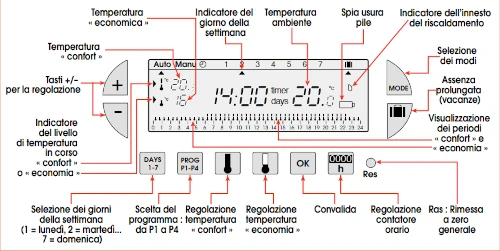
Main buttons include:
+and-MODEDAYS 1-7PROG P1-P4- comfort temperature button
- economy temperature button
OKRESET
How to set the correct time and day
If the clock is wrong, the weekly program will not run when expected.
Practical steps:
- press the RESET button with a pen tip if you are starting from scratch;
- set the time with
+ / -; - choose the day with
DAYS 1-7; - confirm with
OK.
If you only need to correct the time later, use the MODE button until the clock symbol is selected, then adjust again.
How to program the week
The thermostat gives you four programs:
- P1, P2, P3 preconfigured;
- P4 fully customizable.
For many users, P4 is the best choice because it allows a schedule that matches the real routine of the house.
Weekly programming step by step
- press
PROG P1-P4to enter programming; - choose the day with
DAYS 1-7; - select the desired program, usually P4 for custom setup;
- assign economy or comfort to each time block;
- press
OKto save; - repeat for the other days if needed;
- return to automatic mode with
MODE.
How to change comfort and economy temperatures
Comfort temperature
- press the comfort button;
- change the value with
+ / -; - confirm with
OK.
Economy temperature
- press the economy button;
- change the value with
+ / -; - confirm with
OK.
A practical starting point in many homes is:
- comfort: 19-20 °C;
- economy: 16-17 °C.
Common Thermoflash Digi 2 Eco issues
The thermostat does not start heating
Before assuming the thermostat is faulty, check:
- the boiler is in winter mode;
- system pressure is correct;
- no boiler error is active;
- the requested temperature is higher than the room temperature;
- batteries are good and not rechargeable.
If the heating call icon appears but the boiler still does not start, the issue may be in the relay, wiring or boiler rather than the thermostat itself.
Rechargeable batteries cause problems
This is very common. The display may appear normal, but rechargeable batteries often do not provide the right current to operate the relay properly.
The thermostat activates heating at the wrong times
Possible causes include:
- incorrect weekly program;
- economy temperature set too high;
- cooling mode active;
- a boiler-side issue such as frost protection logic or diverter valve behaviour.
The detected temperature seems inaccurate
This model does not offer much sensor calibration flexibility, so installation position matters a lot.
Useful setup tips
- With cast iron radiators, start heating earlier because thermal inertia is high.
- With aluminium radiators, you can usually use tighter schedules.
- With underfloor heating, this thermostat is often less suitable for very refined control.
If you want to understand temperature stability better, our guide on thermal hysteresis and differential may help.
Correct installation position
Install the thermostat:
- away from direct sunlight;
- away from radiators, stoves and kitchens;
- away from windows and draughts;
- on an internal wall;
- at about 1.5 m from the floor.
A poor location can make a good thermostat behave badly simply because it is reading the wrong room temperature.
Wiring note
The thermostat normally uses a standard heating contact:
- common
- normally open
If you are not sure about boiler compatibility or wiring safety, it is better to have the connection checked by a qualified technician.
Technical specifications
| Parameter | Specification |
|---|---|
| Comfort temperature range | +5 °C to +30 °C |
| Reduced temperature range | +5 °C to +30 °C |
| Holiday temperature range | +5 °C to +30 °C |
| Ambient display range | 0 °C to +40 °C |
| Static differential | < 0.3 °C |
| Power supply | 2 alkaline batteries 1.5V LR6 |
| Operating temperature | 0 °C to +40 °C |
| Storage temperature | –20 °C to +70 °C |
| Dimensions | 115 x 82 x 34 mm |
Thermoflash Digi 2 Eco PDF manual
When to ask for technical help
It is worth asking for a technical check if:
- the thermostat appears to work but the boiler never starts;
- the relay logic seems inconsistent;
- wiring compatibility is unclear;
- heating behaviour remains strange after replacing batteries and checking the schedule.
If you need a broader heating-system diagnosis, our boiler assistance in Modena page is a useful starting point.
Accessori consigliati

Per termostati e cronotermostati conviene tenere a portata di mano pile alcaline nuove non ricaricabili, una foto dei collegamenti prima della sostituzione e il manuale PDF salvato sul telefono.

Termostato Wi-Fi
Se il dispositivo e Wi-Fi, verifica sempre alimentazione, rete disponibile e compatibilita del contatto caldaia prima di sostituirlo o collegarlo.