Seitron Tempora Thermostat: Comprehensive Guide
The Seitron Tempora Thermostat is a daily electronic programmable thermostat with simple and immediate settings. Equipped with a mechanical clock, it allows you to set your ideal heating day through small switches. You can set the TEMPORA thermostat for two temperatures, Comfort...
Quick navigation
Contents
The Seitron Tempora Thermostat is a daily electronic programmable thermostat with simple and immediate settings. Equipped with a mechanical clock, it allows you to set your ideal heating day through small switches.
You can set the TEMPORA thermostat for two temperatures, Comfort and Reduction. To activate the heating in Comfort mode outside the programmed times, use the manual function.
The choice of a large knob for the comfort temperature is designed to stand out among all other possible settings.
Useful Tips
- Frequently replace the batteries of the programmable thermostat (about every 2 years)
- Avoid using rechargeable batteries
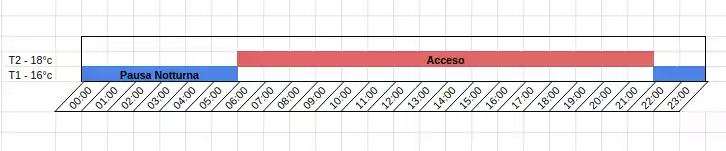
- For the economic temperature (Reduced Temperature) a setting of 16°C + 1°C is recommended
- For the Comfort temperature, a setting of 18°C + 2°C is recommended
- If you have cast iron radiators, program an advance of at least one hour for activation and set the economic mode accordingly to take advantage of the strong thermal inertia of cast iron.
- Conversely, aluminum radiators heat your apartment faster but lack thermal inertia. Adjust the shutdown time accordingly.
Suggested Programs
We suggest some operating programs for the programmable thermostat Seitron Tempora, from the most economical to the most comfortable:


Installation
The regulator should be installed in the reference room, in positions that accurately reflect the ambient temperature, away from disturbance sources such as solar radiation or cold drafts.
- Avoid mounting on metal surfaces or near disturbance sources like electrical cables, electrical appliances (PCs, TVs, microwaves, etc.), and metal walls.
Programming and Use
Set the comfort and economic temperatures. Then program your day through the clock's switches. The switch towards the inside indicates operating in economic mode for the chosen time.
Once the clock is set, rotate it to select the current time. To begin using the chosen program, move the selector (Off/Clock/Manual) to the Clock position.
Instruction Manual
Accessori consigliati

Per termostati e cronotermostati conviene tenere a portata di mano pile alcaline nuove non ricaricabili, una foto dei collegamenti prima della sostituzione e il manuale PDF salvato sul telefono.

Termostato Wi-Fi
Se il dispositivo e Wi-Fi, verifica sempre alimentazione, rete disponibile e compatibilita del contatto caldaia prima di sostituirlo o collegarlo.